Wednesday, 26 October 2016

2 Things that every company is moving towards

1. Cloud:

As I discussed about cloud in my previous post as central repository of data. Now in this post I will discuss about cloud computing. Cloud computing relies on sharing computer resoures directly rather than depending on local or internal servers to maintain or handle various applications of a particular organization. Almost all the companies have on-shore and off-shore teams. These teams work from various places of the world. Storing the data at each and every place where each team works is cost consuming and also a difficult task. So people now a days simply using this cloud to share their resoures directly.
Cloud provides us various services like SAAS, PAAS, IAAS, CAAS etc.,
The computer scientist John McCarthy proposed the concept of computation being delivered as a public utility, similar to the service bureaus which date back to the sixties.
I mentioned as sixties, discuss what happened in sixties..
Since the sixties, cloud computing has developed along a number of lines, with Web 2.0 being the most recent evolution. However, since the internet only started to offer significant bandwidth in the nineties, cloud computing for the masses has been something of a late developer.

In ninties, the first milestone in cloud computing history was made by Salesforce company. The next comes Amazon Web Services in 2002 which provided various services including storage, computation and human intelligence through Amazon Mechanical Turk. Further it provided various products like Elastic Compute Cloud(EC2) and Amazon EC2/E3. Now many big companies like Google, Microsoft, IBM offer their own cloud and cloud services.


How Cloud Computing Works

Cloud computing applies traditional supercomputing, or high-performance computing power, normally used by military and research facilities, to perform tens of trillions of computations per second. In consumer-oriented applications such as financial portfolios, to deliver personalized information, to provide data storage or to power large, immersive online computer games.        

To do this, cloud computing uses networks of large groups of servers typically running low-cost consumer PC technology with specialized connections to spread data-processing chores across them. This shared IT infrastructure contains large pools of systems that are linked together. Often, virtualization techniques are used to maximize the power of cloud computing


2. Agile Methodology

In simple statement 'Agile Methodology is feedback based developing process.' Unlike waterflow methodology
customers interact with the developing team in every fixed time interval(usually 10 working days) to make
any changes needed in the so far developed application. This particular feedback is known as user stroy.

Let us see what user story is.
User story is a short perspective of the customer of what changes he needs to add in the project/Application.

Here is how it is written : As a <type of user>, I want <some goal> so that <some reason>.
Here is one example. As a Operator user I need save button on the top bar always so that I can save my data quickly.

As per the user story further modification will be progressed. 

Based on the user story the development team starts working. This short time interval in which the development team completes the task in the user story is called sprint.

This User Story and Sprints cycle continues till the product is being satisfied by the end customer.

Here are some key features of Agile.
  • Agile results in reducing delivery cycle time. 
  • Raise quality of the solutions. 
  • Improve predictability of the resources. 
  • Improves productivity of the organization. 
  • Provides transparency into project health.
  • Enjoy higher employee engagement.

Monday, 24 October 2016

BIG DATA, CLOUD: What does this DATA means? Why DATA is so important?

BIG DATA, CLOUD: What does this DATA means? Why DATA is so important?

Now a days we are hearing a lot of new about big data, cloud. What does this actually mean..


Yes, it is very important now a days to store the data of  a particular organisation safely, here let us consider Big Data.  It is nothing but a collection of many databases. There are different techniques which are used on this BIG DATA which will be useful in many ways. And from this BIG DATA  there comes a concept called DATA WAREHOUSING AND DATA MINING.  Yes this DW(DATA WAREHOUSING) and DM (DATA MINING) concepts are used in many big organisations and the results which are produced will impact much. For example consider amazon, flipkart websites, there you will be provided with many suggestions, the items which you saw earlier, and also another option like People also Bought. 


Now a days u also getting the ads of the items which you had seen in any e-commerce website . This is all because of the each and every small unit of data that is being stored and refiening that data to get future predictions. 


Now coming to the another most commonly used word in the world "CLOUD", the general definition for cloud is "central repository of data". We use pendrives to carry our data from one place to another, but now there is no need to carry pendrives or disks. We all store our photos, files, videos etc., in the cloud just by signing up. And here comes the most  interesting part, we can get these docs, photos form cloud anywhere and at anytime provided you need to have internet connection in your mobile :-p. In simple words the concept of cloud is like, we all have bank account, ATM card.
Let us map both cloud with bank. We all keep our money in the bank, and the bank people will provide us an ATM card, by using this ATM crad we can get our money at any place and at anytime. The same goes with the cloud also we all store our data in a bank called "Cloud ", 


and this cloud provides us a unique id. Whenever we need our data we just login to the cloud with our unique id and get the data, same as going to an ATM and getting the money.


Any doubts or any improvements that needed to be done in the above text please mention in the comments. 

Back with Banggg..

We are back guys after a long time, from now we will be actively posting about technical stuff weekly and also entertainment related topics twice a month.

 Let's rock!!!!!!!


Friday, 3 July 2015

Want to create a basic app for Android ?

Ok then... Follow these steps to create a basic “Hello world” app.
1. First of all you need to have a framework and particular tool for developing. Either you can use Eclipse or Android studio as a framework. And also download latest SDK tools using  SDK manager.
(These are the links from where you can download framework and tools.
 For Eclipse  : https://eclipse.org/downloads/
 For Android studio:
https://developer.android.com/sdk/index.html
 For SDK tool : https://developer.android.com/sdk/index.html#top )
I suggest it is better to use Android studio.
2. See that your has jdk latest version. To see whether jdk installed in your computer goto cmd and type javac –version, if jdk is not installed or older versions of jdk is present then download jdk (http://www.oracle.com/technetwork/java/javase/downloads/index.html). After installing jdk check whether your Android studio or Eclipse and SDK manager are successfully installed. If they show any error message like launcher script does not find where Java is installed. Then you need to setup a path to current location Select Start menu > Computer > System Properties > Advanced System Properties. Then open Advanced tab > Environment Variables and add a new system variable JAVA_HOME that points to your jdk folder, for example C:\Program Files\Java\jdk1.7.0_21.
3.Launch Android studio or Eclipse framework so that you can enter into an environment where you can develop your first android app.
            ->Goto File > New project
                        A configure window will  appear give a name for the application for example “HelloWorld” and company domain as “helloworld.com” and project location is the space where you wish to store your project so provide project location and click on Next.


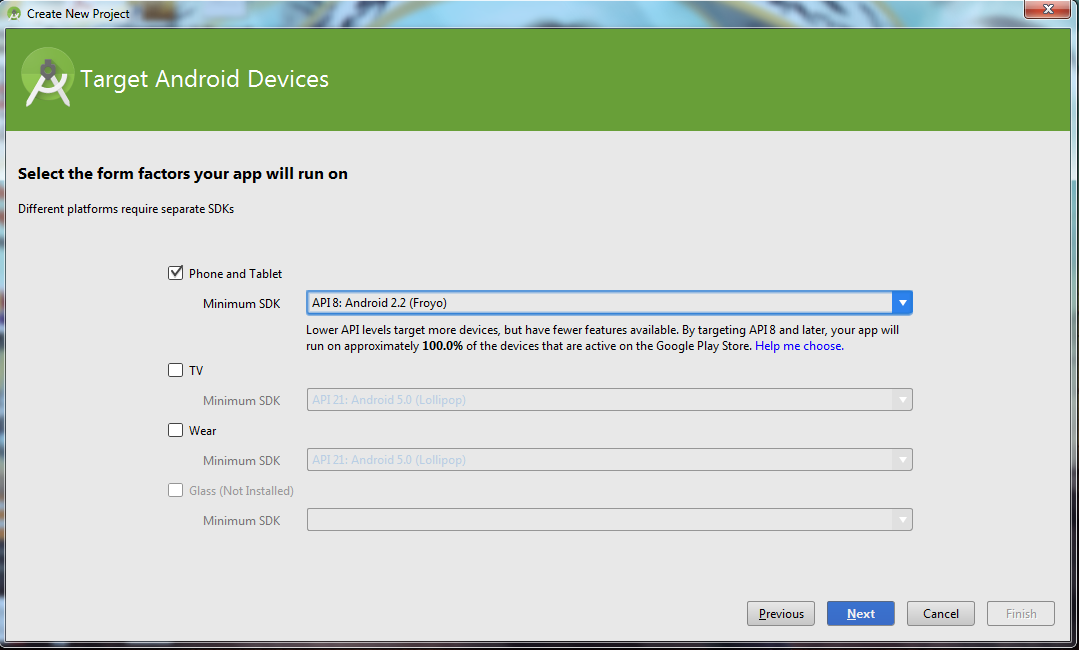
4.Under Select the form factors your app will run on, select phone and tablet. After that select minimum SDK level i.e select Android 2.2 (API 8) then click NEXT.


5. After that under SELECT AN ACTIVITY  select BLANK ACTIVITY and click NEXT. Under Choose options for your new file, change the Activity Name to MyActivity. The Layout Name changes to activity_my, and the Title to MyActivity. The Menu Resource Name is menu_my. Click Finish button.


Your basic Hello World app is finished.

To see the output:
 
1. Create an AVD(Android Virtual Device)  goto Tools > Android > AVD Manager 
 
2. Click Create a virtual device, select any hardware device like Nexus 6 or Profile Nexus and click   on next.
  3.
Select version for your virtual device and click next  .
 
4. Click finish.
Now your AVD will be created.

5. Select the project and click on RUN button in toolbar.
6. In choose device window, click on Launch Emulator.
7. Now select the emulator, click OK.
   
           
It will take some time for the emulator to open, once it opens unlock the screen and you can find your app with the application name that you mentioned (here Helloworld), click on that Helloworld app in AVD and you can see your Hello World on that Virtual android phone.


Any problem in creating app, please comment I will help you. Thank You :-)

Cranium Krusherz

Thursday, 2 July 2015

Fallout shelter for Android

When Fallout Shelter was released on iOS only at E3 2015, the Android gaming community gave a collective sigh –while a version for Android was promised, it was yet another case of platform favouritism that is by now way beyond wearing thin. Still, we'd prefer to get the game at least, which has had a barnstorming run on the Apple App Store, and it appears it could be sooner than we expected with Bethesda PR guru, Pete Hines, saying that Fallout Shelter for Android is coming out in August, or thereabouts:


What do you think about Fallout Shelter's tentative release date on Android? Let us know your thoughts in the comments below.


Source: TouchArcade .

Quiz on technology